Claude Code vs Cursor: Real-World AI Coding Tool Showdown
We tested Claude Code and Cursor on real Flutter apps and a Next.js monorepo for two weeks. Speed, accuracy, cost, and workflow compared with hard data.
TL;DR
Claude Code lives in your terminal and chats like a senior pair programmer. Cursor blends into your IDE and feels like an autocomplete on steroids. After fourteen days of cross-testing them on real shipping projects, the answer isn't "which one is better" — it's "which workflow are you actually doing today?"
This article compares the two tools head-to-head. If you want to see where they fit in a broader workflow, we covered that in the Korean piece on the solo developer automation stack.
Claude Code vs Cursor — the spec sheet
| Dimension | Claude Code | Cursor |
|---|---|---|
| Form factor | CLI (terminal) | IDE (VS Code fork) |
| AI model | Claude 4 Opus / Sonnet | GPT-4o, Claude, and others |
| Context window | Auto-indexes the whole project | Open files plus @reference |
| Monthly price | $20 (Max plan) | $20 (Pro) |
| File edits | Performs edits directly (with approval) | Suggests diffs you apply manually |
| Multi-file work | Edits 5–10 files at once | Goes file by file |
| Learning curve | Low (plain language) | Medium (IDE shortcuts plus @ commands) |
| Offline | No | No |
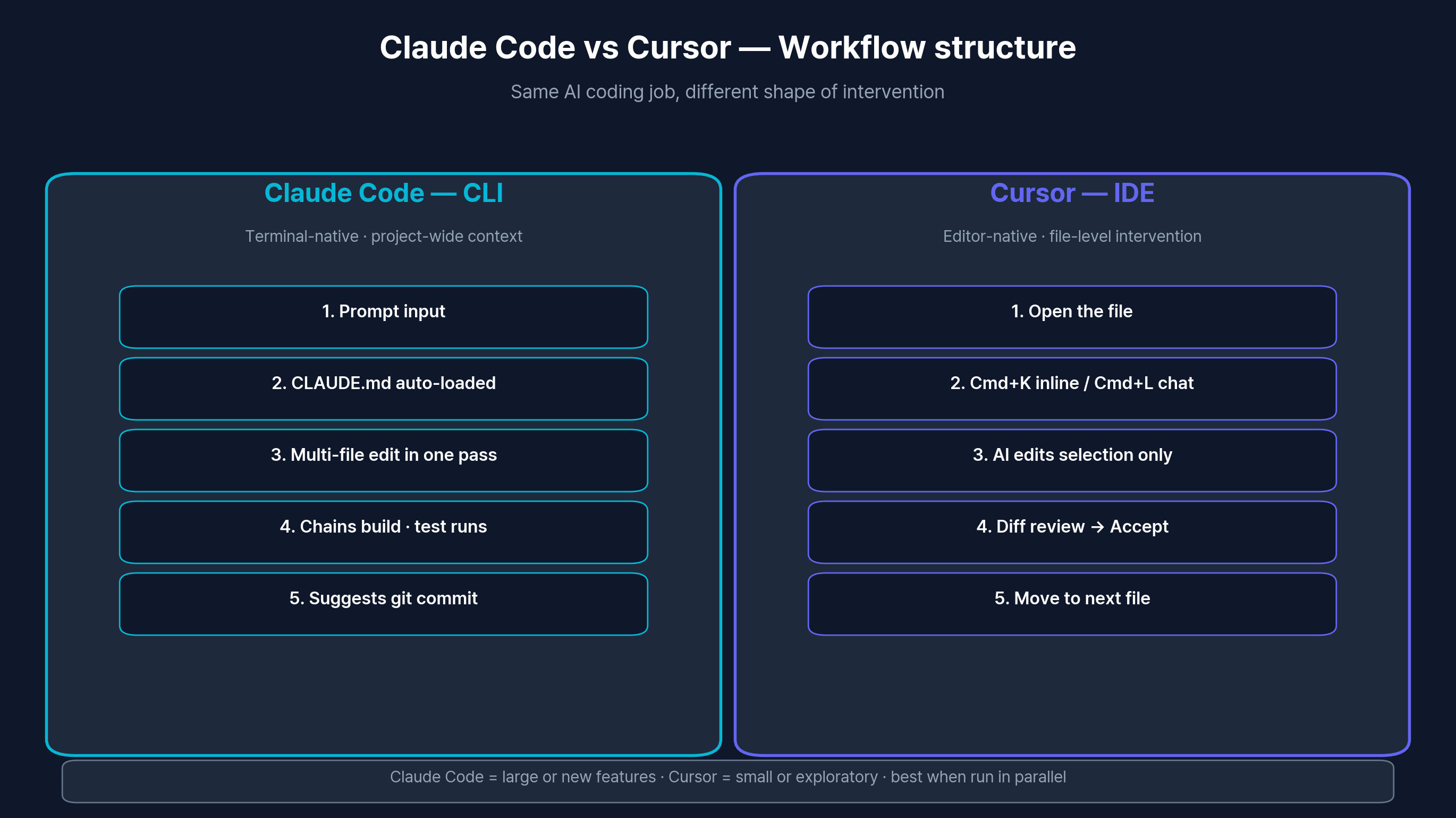
Same job, different points of intervention — running both in parallel is often optimal.
Five real scenarios — how each tool actually behaves
We didn't run synthetic benchmarks. We ran the work that was already on the calendar.
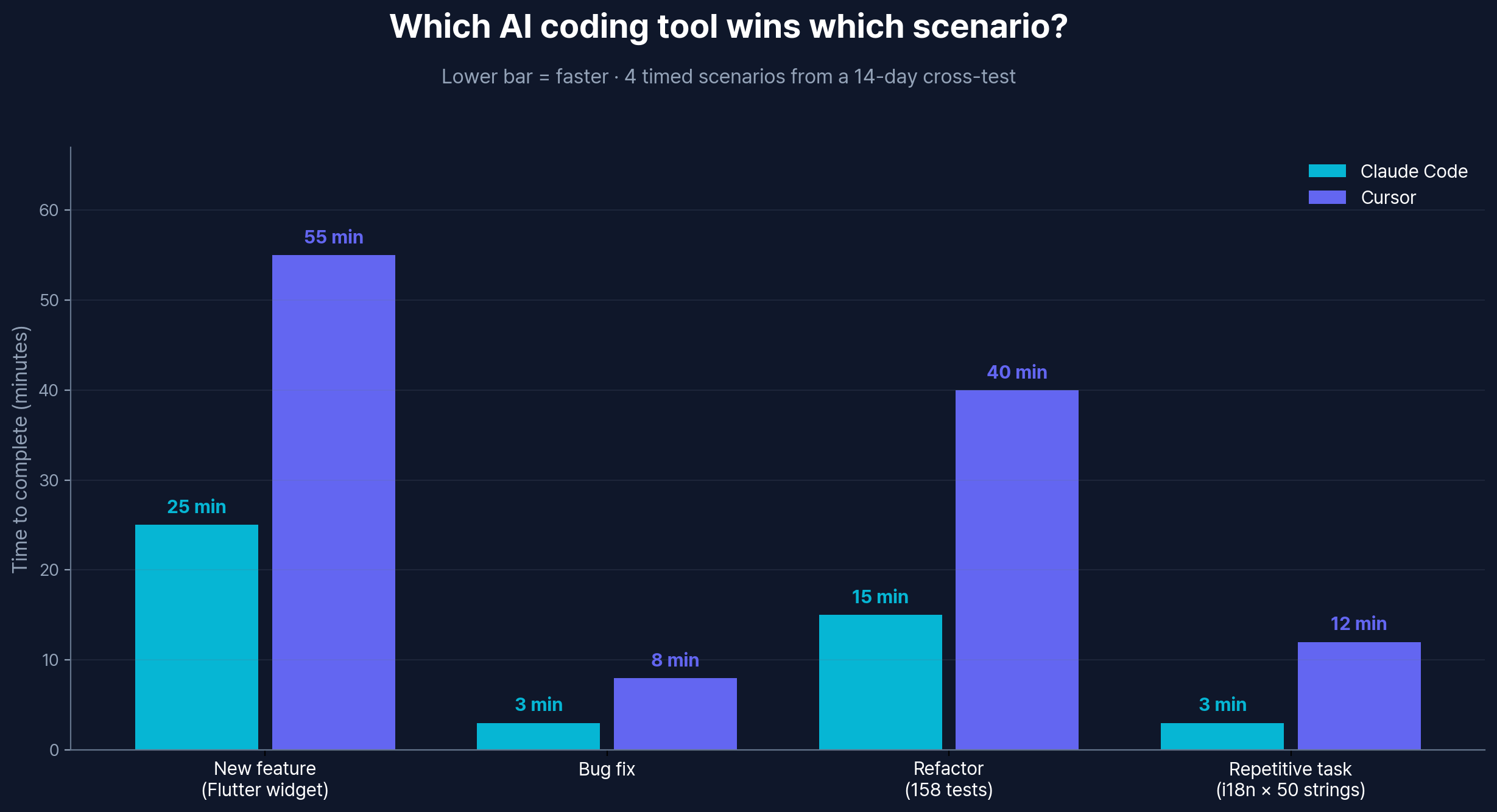
Scenario 1: Building a new feature (Flutter home widget)
The task: add a home screen widget to GentleDo, which meant touching iOS WidgetKit (Swift), Android AppWidget (Kotlin), and the Flutter service layer simultaneously.
| Metric | Claude Code | Cursor |
|---|---|---|
| Time to complete | ~25 min | ~55 min |
| Files generated | 6 in one pass | One at a time |
| First build clean | Yes | No (missing imports x2) |
| Revisions needed | 1 (small polish) | 4 |
Claude Code read the project's CLAUDE.md, picked up the existing conventions, and produced Swift, Kotlin, and Dart files in a single coordinated pass. Cursor required us to open each file individually, and it occasionally lost track of import paths between files. That whole-project awareness is the headline difference, and it was the same factor that made the Korean writeup of building three Flutter apps with Claude Code possible at all.
Scenario 2: Bug hunt
The task: notifications were disappearing after an app restart.
| Metric | Claude Code | Cursor |
|---|---|---|
| Time to root cause | 3 min (full-repo grep) | 8 min (manual file hopping) |
| Fix accuracy | Correct | Correct |
| Test coverage added | Suggested automatically | Had to ask for it |
Both tools landed the right fix. The gap was in the discovery step — Claude Code searched the whole tree on its own, while Cursor needed a hint about which file owned notification setup.
Scenario 3: Large-scale refactor
The task: unify the provider pattern across 158 tests.
| Metric | Claude Code | Cursor |
|---|---|---|
| Time to complete | ~15 min | ~40 min |
| Consistency | High | Medium (small per-file drift) |
| Missed sites | 0 | 3 |
This was the most lopsided result of the test. Claude Code applied the conventions defined in CLAUDE.md uniformly across every file. Cursor produced correct edits, but with subtle inconsistencies between files that we had to clean up afterward.
Scenario 4: Greenfield scaffolding
The task: stand up a Next.js Turborepo blog monorepo from scratch.
| Metric | Claude Code | Cursor |
|---|---|---|
| Architecture decisions | Walked through interactively | Generated upfront via Composer |
| Config files | Correct | Correct |
| Boilerplate volume | Lean (only what's needed) | Generous (template-style) |
Roughly a tie. Cursor's Composer mode was great for stamping out a lot of files at once. Claude Code took the slower, more conversational path and explained "why this structure" as we went. Both got us to a working repo.
Scenario 5: Repetitive work (i18n and tests)
The task: add 50 strings to ARB files, translate them to English, and update every code reference.
| Metric | Claude Code | Cursor |
|---|---|---|
| Time to complete | 3 min | 12 min |
| Translation quality | Natural | Natural |
| Code wiring | Automatic | Required manual checks |
Repetitive multi-file work is where Claude Code pulls away the most. One instruction handled both ARB files and every Dart reference at once.
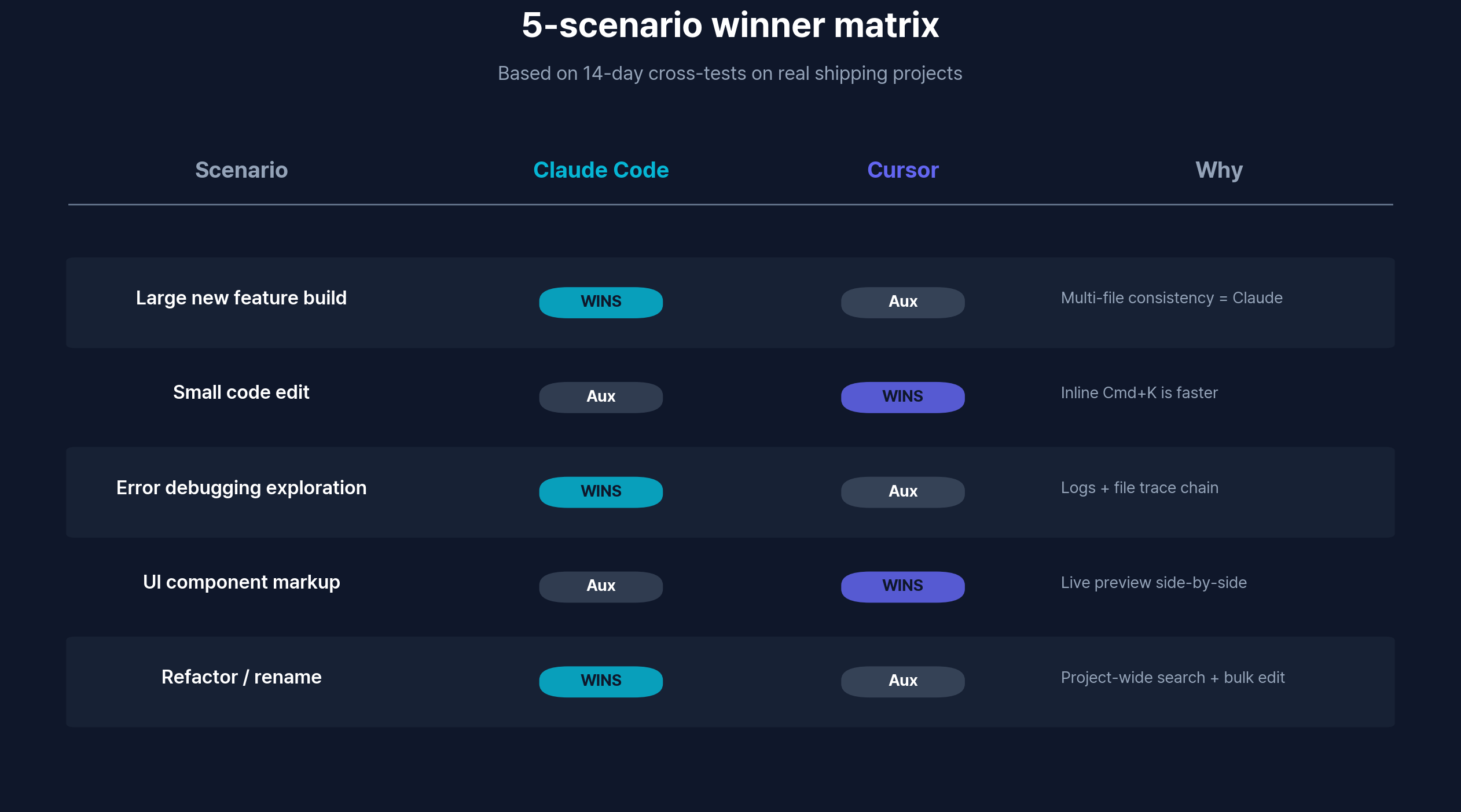
Per-scenario winners — Claude Code dominates large and repetitive work; Cursor edges ahead on focused UI tweaks.
Pricing — what you're really paying for
| Item | Claude Code | Cursor |
|---|---|---|
| Free trial | None | 2 weeks of Pro |
| Base plan | $20/mo (Max) | $20/mo (Pro) |
| Token / request limit | Usage-based | 500 fast requests/mo |
| Overage behavior | Metered billing | Falls back to a slower model |
Same sticker price, different shape underneath. Claude Code costs flex with how much you talk to it. Cursor gives you 500 fast requests per month and quietly downshifts to a slower model after that. Note that the underlying model also matters — we ran a separate breakdown of Claude 4 Sonnet vs GPT-4o because the default model in each tool affects output quality independent of the tool's UX.
Who should pick which one
Claude Code is the right fit if you...
- Are a non-engineer or vibe-coder who thinks in plain language rather than code
- Routinely touch 5+ files for a single feature
- Maintain a
CLAUDE.md-style project rulebook and care about consistency - Already prefer the terminal over IDEs
Cursor is the right fit if you...
- Live in VS Code and want to keep that muscle memory
- Need real-time inline completion as you type
- Want to switch between GPT-4o, Claude, and local models freely
- Prefer a diff-review workflow where you accept edits one by one
The verdict
✓ 장점
- Claude Code: whole-project context, multi-file edits in one pass, friendly to non-engineers
- Cursor: tight IDE integration, real-time autocomplete, clean diff review UI, model flexibility
✗ 단점
- Claude Code: no IDE (terminal only), variable monthly cost
- Cursor: file-centric mental model, weaker project-wide awareness, hard 500-fast-request cap
In practice we kept Claude Code as the primary driver. For a non-engineer, "build me this feature" turning into a coordinated multi-file edit is the workflow that actually shipped products. Cursor stayed installed for one-line tweaks and quick autocomplete moments where opening a terminal would feel like overkill.
Frequently asked questions
Do I need to subscribe to both Claude Code and Cursor?
No. Running both costs $40/month, and that's only worth it if you genuinely use each one for different work. If most of your time goes into multi-file features and refactors, Claude Code alone is enough. If you mostly polish UI in VS Code, Cursor alone is enough. We recommend starting with one for at least two weeks before adding the second.
How predictable is the monthly cost?
Both list at $20/month. Claude Code's Max plan is usage-metered, so a heavy refactor week can push you into overage charges. Cursor caps you at 500 fast requests, then silently switches to a slower model rather than billing more. For most solo builders the real spend stays close to $20 either way.
How are the two tools at writing non-English code comments?
Both produce natural comments and explanations when you run them on a Claude model. Cursor's default GPT-4o sometimes reads as a stiff translation in non-English languages, and switching the Cursor model to Claude clears that up. If your team writes docs and comments in a non-English language, set Claude as your default model.
If I pick Claude as the model inside Cursor, do the two tools become equivalent?
No. Even with the same model, Cursor still relies on open files and @file references for context, while Claude Code auto-indexes the whole project. Same model, different context-gathering strategy — and the strategy is what drives the multi-file results above.
Which one should a beginner start with?
Claude Code, in most cases. If you're comfortable with cd and ls, you can drive a whole project in plain English. Cursor is friendlier if you already have VS Code experience, because its UI assumes you know IDE shortcuts and the @ reference system.
Closing thought
Both tools belong in the modern AI coding stack. The right framing isn't "which one wins" — it's "which one matches the work in front of you." If you do mostly multi-file features and large refactors, Claude Code. If you do mostly focused UI polish inside VS Code, Cursor. Try both for two weeks (Cursor's free trial plus a single Claude Code month) and trust the data your own projects produce.
For deeper Korean coverage on adjacent topics: Claude MCP guide for connecting Claude Desktop to Obsidian/Craft, Notion AI use cases for non-coding workflows, and Perplexity vs Google search for AI-powered research.